 Nam
Nam
“Add English to the website” is one of those tasks that sounds small and isn’t. Anyone who shipped localization at a company in the 2000s or 2010s knows it was a project — a cast of five, a calendar measured in months, and a maintenance bill that never went away.
Last week I added a full English mirror to a 100-page site — 200+ pages total, real in-context translation, the whole international-SEO layer, a language switcher, per-language typography — in one afternoon, driving an AI agent. This post isn’t about the site (that’s its own series). It’s about the method: the prompts I used, the code shape that made it cheap, and — because it matters — the part the machine didn’t do.
If you have a site you’ve been meaning to translate, you can copy this.
Table of contents
Open Table of contents
First, what this used to cost
I’m not being nostalgic to pad the intro — the contrast is the point. The old ritual:
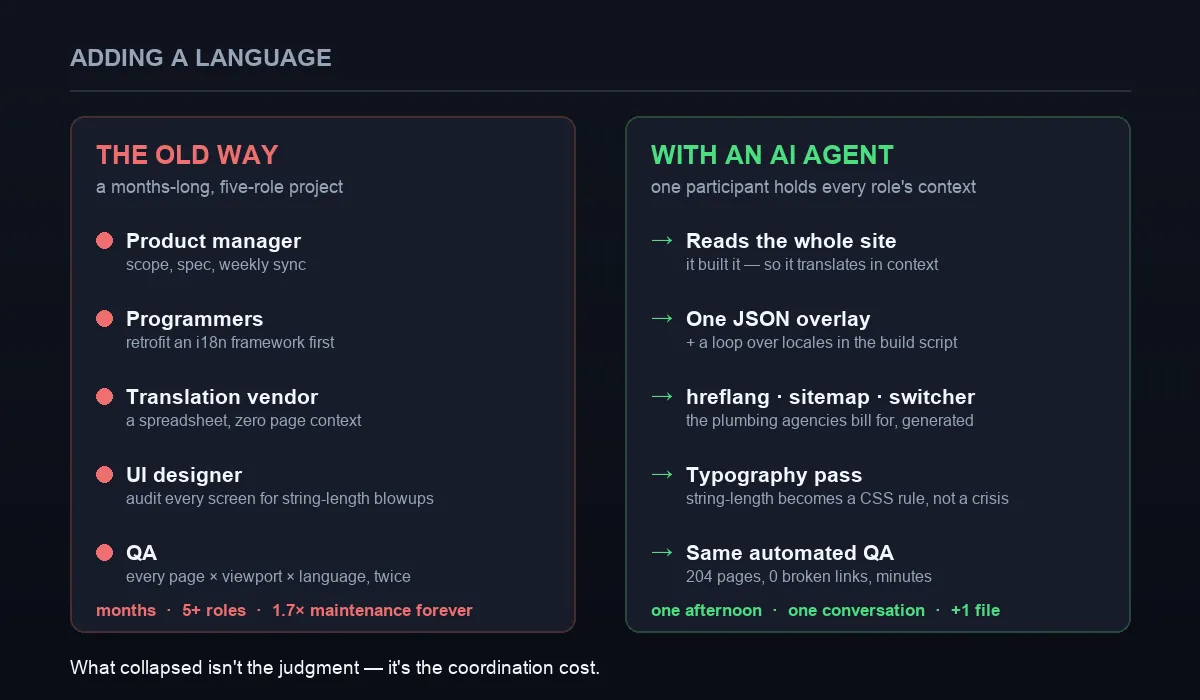
What actually collapsed isn’t the translation — it’s the coordination between five roles.
- A product manager to scope which pages, write the spec, and chair the weekly localization sync.
- Programmers to retrofit an i18n framework first — weeks of extracting hardcoded strings into resource files before a single word got translated.
- A translation vendor working from a spreadsheet with zero page context, producing the classic howlers (“Home” as 住宅) that round-trip through review for weeks.
- A UI designer auditing every screen for string-length blowups — the eternal localization tax, where a 4-character Chinese label becomes 30 characters of English and the button truncates or the nav wraps.
- QA regression-testing every page × every viewport × both languages, twice, because fixing one locale’s layout broke the other.
Months. Five-plus roles. And forever after, two languages ≈ 1.7× the maintenance surface. Hold that in mind while we do it with one conversation.
The mental model that makes it cheap: an overlay, not a rewrite
Before any prompt, the idea that makes the whole thing tractable: a second language is an overlay on your existing site, not a second site. You don’t fork your pages; you add one file of strings and loop your build over the locales.
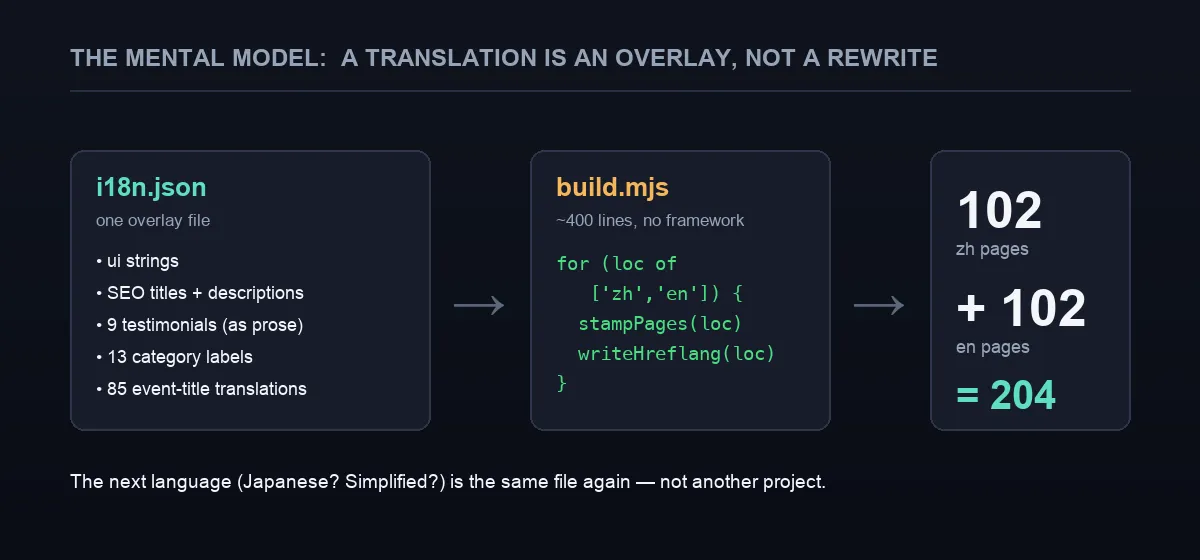
One overlay file plus a loop. The next language after this is the same file again — not another project.
Concretely, the entire “localization project” is one JSON file:
{
  "en": {
    "nav": { "home": "Home", "about": "About", "portfolio": "Portfolio", "courses": "Courses" },
    "seo": {
      "home": { "title": "Krystle Cheung | Hong Kong Bilingual MC & Emcee", "description": "…" }
    },
    "testimonials": { "toby": "Thank you Krystle for all your help on our big day!" },
    "categories": { "opening": "Kick-off & Opening Ceremonies" },
    "events": { "party-lny": "Lunar New Year Corporate Party" }
  }
}
…and a loop in the build script that stamps both languages from the same templates:
for (const loc of ["zh", "en"]) {
  const strings = loc === "zh" ? source : i18n.en; // zh = originals, en = the overlay
  for (const page of pages) {
    render(page, loc, strings);   // one template, a second voice
    writeHreflang(page, loc);     // the mechanical SEO layer, below
  }
}
Everything after this is just telling the agent to fill that file well and generate the plumbing around it. Which is where the prompts come in.
The prompts that did the work
These are close to what I actually typed, lightly cleaned up. The thing to notice is why they work: the agent had already read (in fact, built) every page, so it translates in context, and I explicitly ask it to do the tedious mechanical layers in bulk rather than checking with me per page.
1 — Frame the architecture (the most important prompt).
Add a full English mirror of this site under
/en/. Don’t change the design or the existing Chinese pages. Drive it entirely from one overlay file,data/i18n.json, holding every English string: nav, SEO titles and descriptions, the about-page bio, all testimonials, category labels, and one entry per event title. In the build, loop over["zh","en"]and stamp both from the same templates. Keep identical URLs, just prefixed with/en/.
This front-loads the whole design. Naming the file, the locales, and “same templates” stops the agent inventing a heavier framework than you need.
“Don’t change the design or the Chinese pages” is doing a lot of work. Agents are eager; a boundary is as useful as an instruction. I got zero regressions on the original language because I fenced it off explicitly.
2 — Translate in context, not word-for-word.
Fill the English strings in
i18n.jsonas natural English a native reader would actually write — not literal translations. Testimonials should read like real testimonials; render 司儀 as “MC”, not “ceremony master”; give official events their full published English names. Keep the brand voice: warm, professional, concise.
This is the prompt that a translation vendor working from a spreadsheet couldn’t execute, because they never saw the pages. The agent did, so 「好多謝 Krystle 喺我 Big Day 咁幫手!」 became prose an English reader would write, and a mouthful like 「佐敦谷水道中秋綵燈展亮燈儀式」 got its real official English name instead of a literal gloss.
3 — Generate the SEO plumbing mechanically.
For every page pair, generate the international-SEO layer: a localized
<html lang>, a self-referencing canonical,rel="alternate"hreflang forzh-HK,en-HKandx-default(absolute URLs),og:locale, and a sitemap where each<url>carriesxhtml:linkalternates for both languages. This is mechanical — do it for all 200+ URLs, don’t ask me page by page.
The output is exactly the boilerplate agencies bill real money for:
<link rel="alternate" hreflang="zh-HK" href="https://example.com/portfolio-item/party-lny/" />
<link rel="alternate" hreflang="en-HK" href="https://example.com/en/portfolio-item/party-lny/" />
<link rel="alternate" hreflang="x-default" href="https://example.com/portfolio-item/party-lny/" />
…and in the sitemap (note the xmlns:xhtml namespace on <urlset>), each URL declares every language variant including itself:
<url>
  <loc>https://example.com/portfolio-item/party-lny/</loc>
  <xhtml:link rel="alternate" hreflang="zh-HK" href="https://example.com/portfolio-item/party-lny/" />
  <xhtml:link rel="alternate" hreflang="en-HK" href="https://example.com/en/portfolio-item/party-lny/" />
  <xhtml:link rel="alternate" hreflang="x-default" href="https://example.com/portfolio-item/party-lny/" />
</url>
4 — A switcher that keeps the reader’s place.
Add a language switch to the header and mobile menu that preserves the deep path: from
/en/portfolio-item/party-lny/it lands on/portfolio-item/party-lny/, and vice-versa — the equivalent page in the other language, never the homepage.
It’s a tiny function, but it’s the difference between a switcher people use and one they don’t:
// /en/portfolio-item/party-lny/  ⇄  /portfolio-item/party-lny/
const swapLocale = (path) =>
  path.startsWith("/en/") ? path.replace(/^\/en/, "") : "/en" + path;
5 — Make string-length a typography pass, not a crisis.
English strings run much longer than the Chinese (a 4-character label can become 30). Do a typography pass: give each language its own letter-spacing and readability rules, and verify long event titles wrap gracefully inside the cards instead of overflowing.
The old string-length tax — a designer-sprint of its own — became a few CSS rules:
:lang(zh) { letter-spacing: 3px; }              /* wide tracking reads elegantly in 中文 */
:lang(en) { letter-spacing: normal; }           /* the same tracking looks gappy in English */
Because the layout was already built to wrap (flexible grids, no fixed-height cards), “Kick-off & Opening Ceremonies” (29 chars) sits in the same slot as 「起動 / 開幕典禮」 (7 chars) without exploding.
The one thing the machine didn’t do
Here’s the honest line, and it’s the one that keeps the rest credible: the agent didn’t replace judgment. Someone still decided that testimonials should sound like testimonials, that the English brand voice is warm-professional, that 司儀 is “MC” and not something a dictionary would offer, and that some client names should be anonymized in translation. Those are taste calls.
What collapsed was the coordination cost — the five-role relay compressed into one conversation where a single participant holds the context of the translator, the programmer, the SEO specialist, the designer, and QA all at once. The marginal cost of this language dropped to one JSON file. The marginal cost of the next one (Japanese? Simplified Chinese?) is the same file again.
“One overlay file + a loop + the agent generates the mechanical layer + a human keeps the taste” is not really about i18n. It’s how a lot of the tedious-but-structured work goes now: the machine does the 200-page mechanical pass, you do the fifty judgment calls. Localization is just an unusually clean example.
Verifying it (the boring, essential part)
None of this ships on vibes. The check was the same automated pass as any build: 204 pages generated, an internal-link crawl reporting 0 broken links across all of them, and smoke tests on paired zh/en pages. The only shell command involved:
npm run build # stamps all 204 pages + runs the link checkThen push, and it’s live in about a minute — the git-connected Cloudflare deploy I wrote up here.
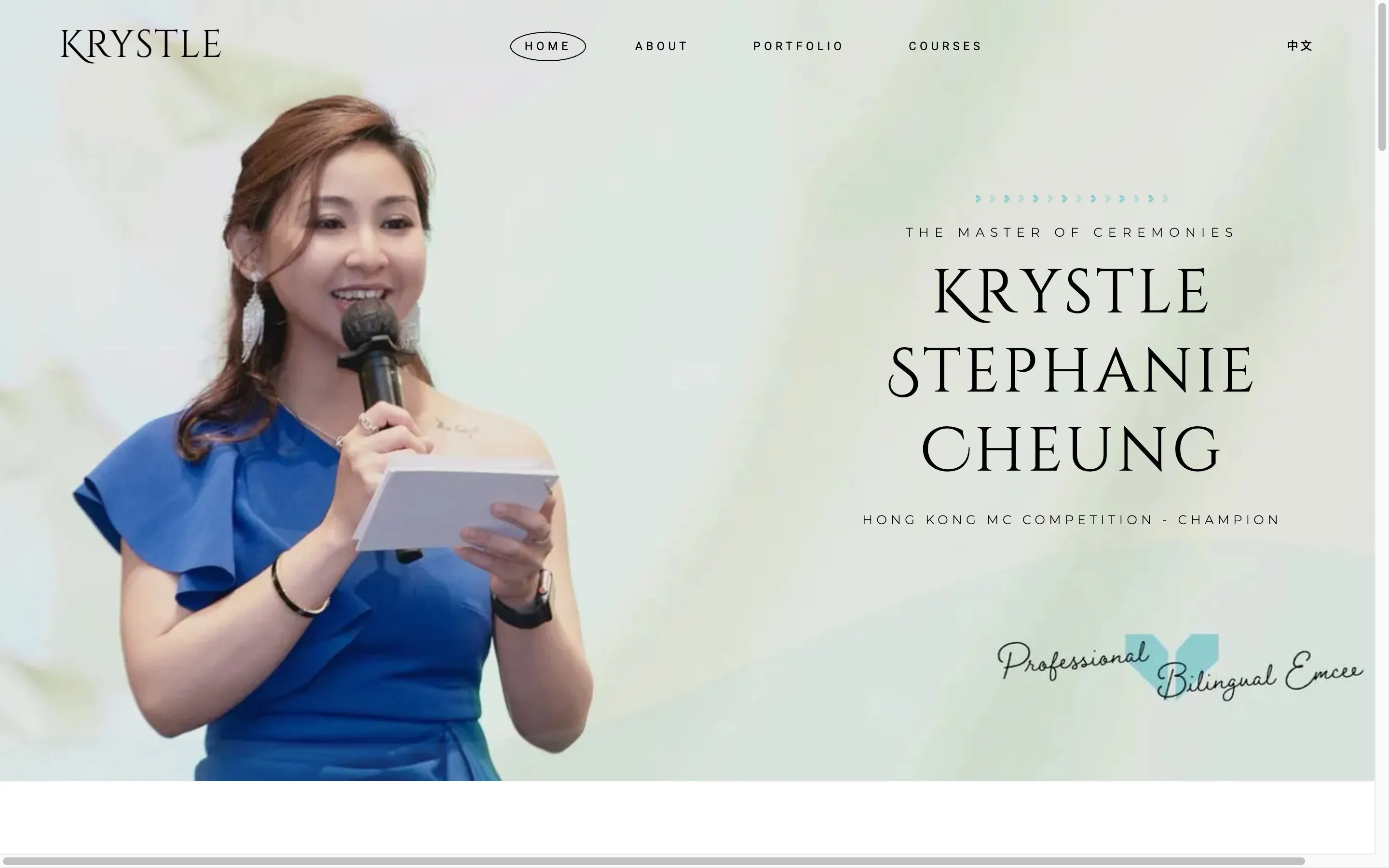
The result: the English mirror, visually identical to the original, generated from the overlay and the loop. One JSON file’s worth of new source produced a hundred new pages.
One comparison to close on. The old WordPress way to do multilingual was usually a plugin — WPML, itself a heavy paid add-on: double the database rows, another dependency to patch, and a real chunk off your performance score. Here: twice the pages, the same 100 Lighthouse scores, sub-second paint, zero new dependencies. The overlay-and-loop approach doesn’t tax the site for the second language; it just… stamps more pages.
Takeaway
The tools didn’t just make translation faster — they dissolved the org chart around it. A task that needed five people and a quarter now needs one person, one afternoon, and the discipline to write clear prompts and keep the judgment calls yourself.
So if there’s a site you’ve been meaning to open up to a second audience: the overlay file is small, the plumbing is generatable, and the machine will happily do the 200-page mechanical pass. Bring the taste; delegate the toil.
Thinking about a second (or third) language for your site and want a sanity-check on the approach before you commit? Email me — happy to look at your setup.
If you got something from this: follow me on Medium, subscribe or bookmark nam-ai.uk for more build-in-public write-ups, and connect on LinkedIn — I like comparing notes with people who ship.
Rebuilding my wife’s website: Part I — WordPress → static · Part II — the UI · Part III — the SEO · Part IV — post-launch lessons · Part V — you’re here (making it bilingual).