 Nam
Nam
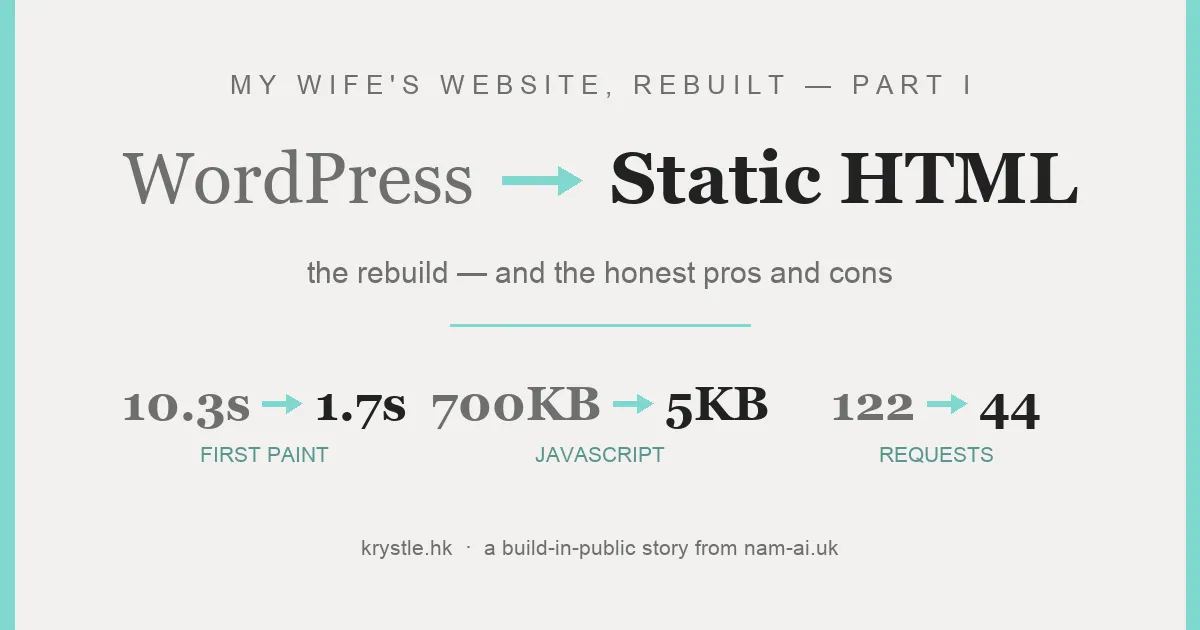
My wife Krystle (張可澄) is a professional bilingual MC in Hong Kong — five thousand-plus events, a Hong Kong MC Competition championship, the works. Her portfolio site, krystle.hk, is how new clients find her.
Last weekend I finally looked under its hood. It ran WordPress + Elementor + a heavy theme, scored 56 on Lighthouse with a 13.8-second largest paint — and hid one genuinely painful bug that deserves its own post (that’s Part II).
One Sunday evening with Claude Code later: the whole thing is rebuilt as 102 pages of dependency-free static HTML. Same design, same URLs. First paint 1.7 s, ~5 KB of JavaScript, zero broken links.
This is Part I — the rebuild itself, and an honest look at when leaving WordPress is the right trade (and when it isn’t).
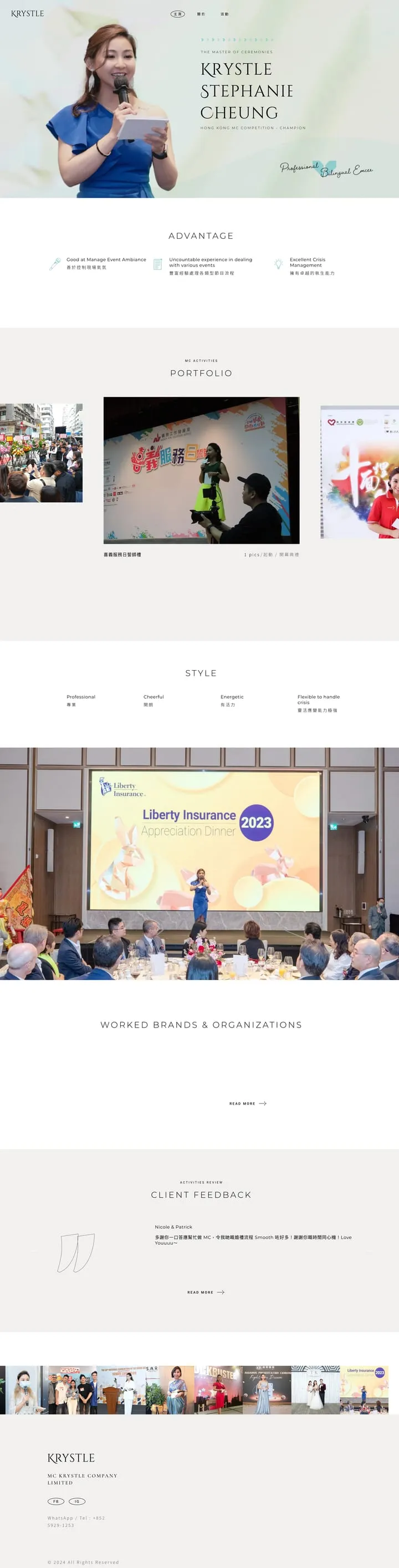
The original WordPress homepage…

…and the rebuild. Visually the same site — that was the brief. Everything underneath changed.
Table of contents
Open Table of contents
The audit: what was actually being shipped
First step: crawl the sitemap, download all 101 pages and 2,186 asset files (223 MB), screenshot everything, and run a throttled Lighthouse baseline.
The homepage alone shipped 20 CSS files, 70 JS files — 122 requests, 2.2 MB. That included React, ReactDOM and lodash on every page… loaded by WooCommerce, for a shop with zero products. And Contact Form 7, for a site with zero forms. Nobody had chosen any of this; it’s just what accumulates when a theme, a page builder and a decade of plugins each bring their friends.
Fonts were their own small disaster: 872 KB across 17 requests — every weight of Noto Sans TC, Montserrat and Roboto, mostly unused.
The audit also found that a broken “Load More” button had been silently hiding 76 of her 85 events from every visitor. That story — and how the interface was rebuilt so it can’t happen again — is Part II: the UI.
The plan: same site, a hundredth of the code
The brief was strict on purpose. Same look. Same pages. Same URLs — nothing 404s, the Google index survives. No redesign. Just take everything the WordPress stack did with plugins, and do it with almost nothing:
| WordPress (heavy) | Rebuild (light) |
|---|---|
| Slider Revolution hero (~700 KB JS) | one composed image + CSS-positioned text layers |
| jQuery + GSAP scroll animations | ~30 lines of IntersectionObserver + CSS transitions |
| Isotope filter + AJAX “Load More” | all 85 cards in the DOM; filter = show/hide — no network |
| Magnific Popup lightbox | native <dialog> + ~40 lines of JS |
| Google Fonts: 17 requests, 872 KB | self-hosted subsets: 5 files, 392 KB |
| WooCommerce / CF7 / Instagram plugins | deleted; junk URLs 301’d |
(What each of those replacements looks and feels like — the hero, the filter, the lightbox, mobile — is Part II’s territory.)
The build
The architecture is one idea: hand-written templates + a small Node build script + JSON data files. Python scripts parsed the downloaded WordPress HTML into clean JSON — nav, hero, testimonials, the 84-logo client wall, and per-event data. Then build.mjs (no framework, ~400 lines) stamps out all 102 pages, and a sharp pipeline generated 805 image derivatives (WebP grids, two gallery sizes, og:images) from the 397 originals.
The whole site now ships ~19 KB of CSS and ~5 KB of JavaScript — less interactive code than the old site’s smallest single plugin file. The CJK trick mattered most: full Noto Sans TC is enormous, so the build subsets it to the 919 glyphs the site actually uses (272 KB, variable weight axis intact).
A debugging war story
The phantom 6.5-second LCP. After the rebuild, Lighthouse’s simulated-throttling mode insisted LCP was 6.5s with a five-second “render delay”. Its own filmstrip showed the hero fully painted at 1.9s, and a real DevTools-throttled trace (4× CPU, Slow 4G) measured LCP at 207 ms. Hours of variant-testing — killing animations, inlining CSS, swapping test servers (fun fact: Python’s http.server speaks HTTP/1.0 with no keep-alive, which distorts the simulator further) — proved it was a measurement artifact.
Simulator said 6.5s. Filmstrip said 1.9s. Real trace said 0.2s. When a metric contradicts the pixels, check the filmstrip and a real trace before “fixing” anything — the score was lying, the page wasn’t.
(There was a second war story — a font whose kerning data mangled Krystle’s own surname. It’s a UI bug, so it lives in Part II.)
The results
| Metric (throttled mobile) | WordPress | Static rebuild |
|---|---|---|
| First Contentful Paint | 10.3 s | 1.7 s |
| Speed Index | 10.3 s | 2.5 s |
| Real-trace LCP (4× CPU, Slow 4G) | — | ~0.2 s |
| Homepage requests | 122 | ~44 |
| Fonts | 872 KB · 17 req · third-party | 392 KB · 5 req · self-hosted |
| JavaScript shipped | ~700 KB incl. React + jQuery | ~5 KB vanilla |
| Lighthouse Accessibility | 94 | 100 |
| Lighthouse Best Practices | 96 | 100 |
(The SEO column — 85 → 100 — gets its own scoreboard in Part III.)
QA before calling it done: all 815 internal URLs across the 102 pages checked — zero broken; filter, load-more and lightbox exercised in a real browser; desktop and mobile visually diffed against the original’s screenshots.
Then came the boring-but-scary step — full WordPress backup, then the DNS flip to Cloudflare. krystle.hk is live on the rebuild, so the referee I deferred to earlier got its say:
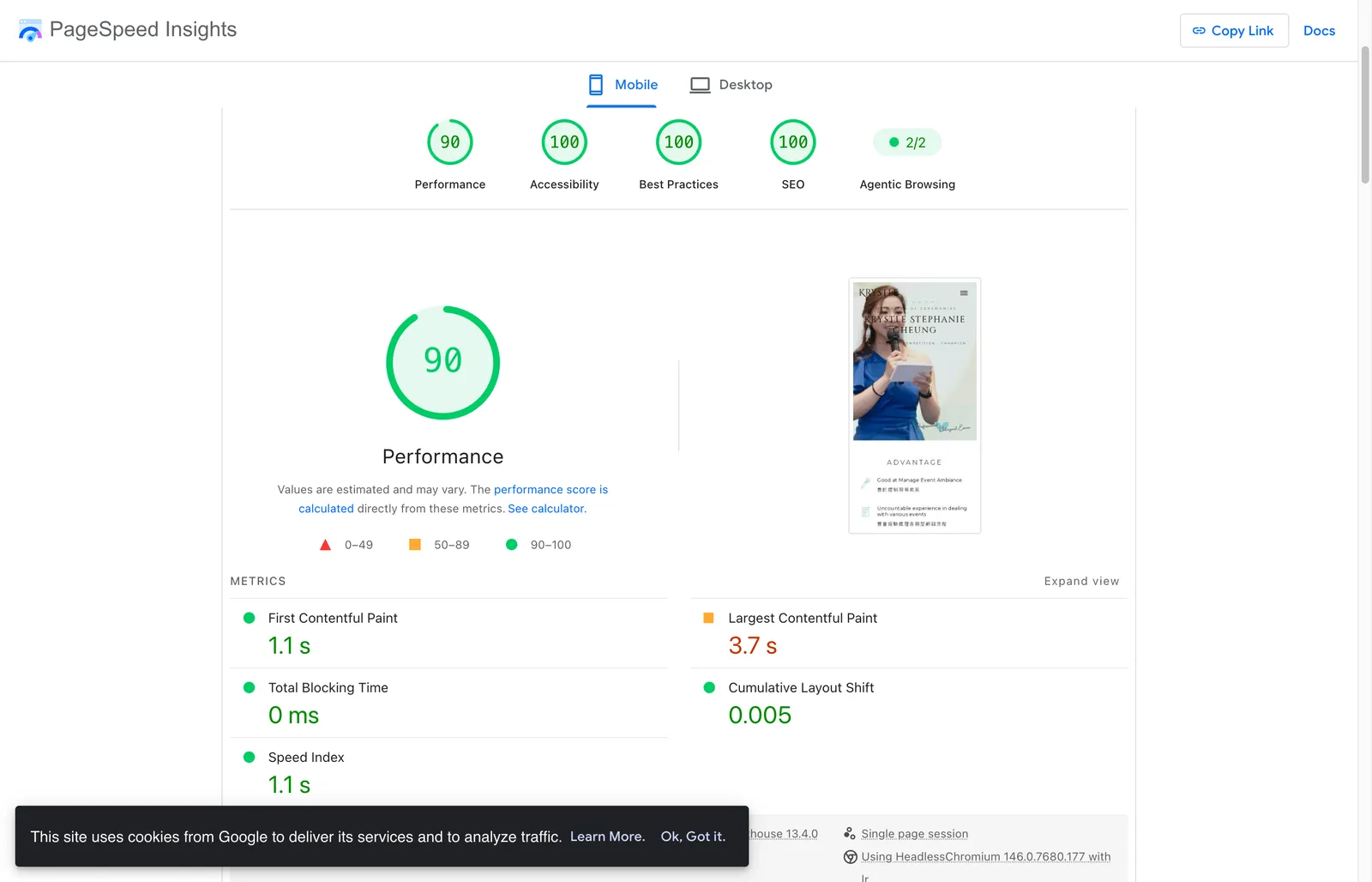
Live PSI, mobile: 90–95 depending on the run (PSI wobbles a few points) — 0 ms blocking time, 0.005 layout shift. The old site scored 57 on the same test hours earlier.
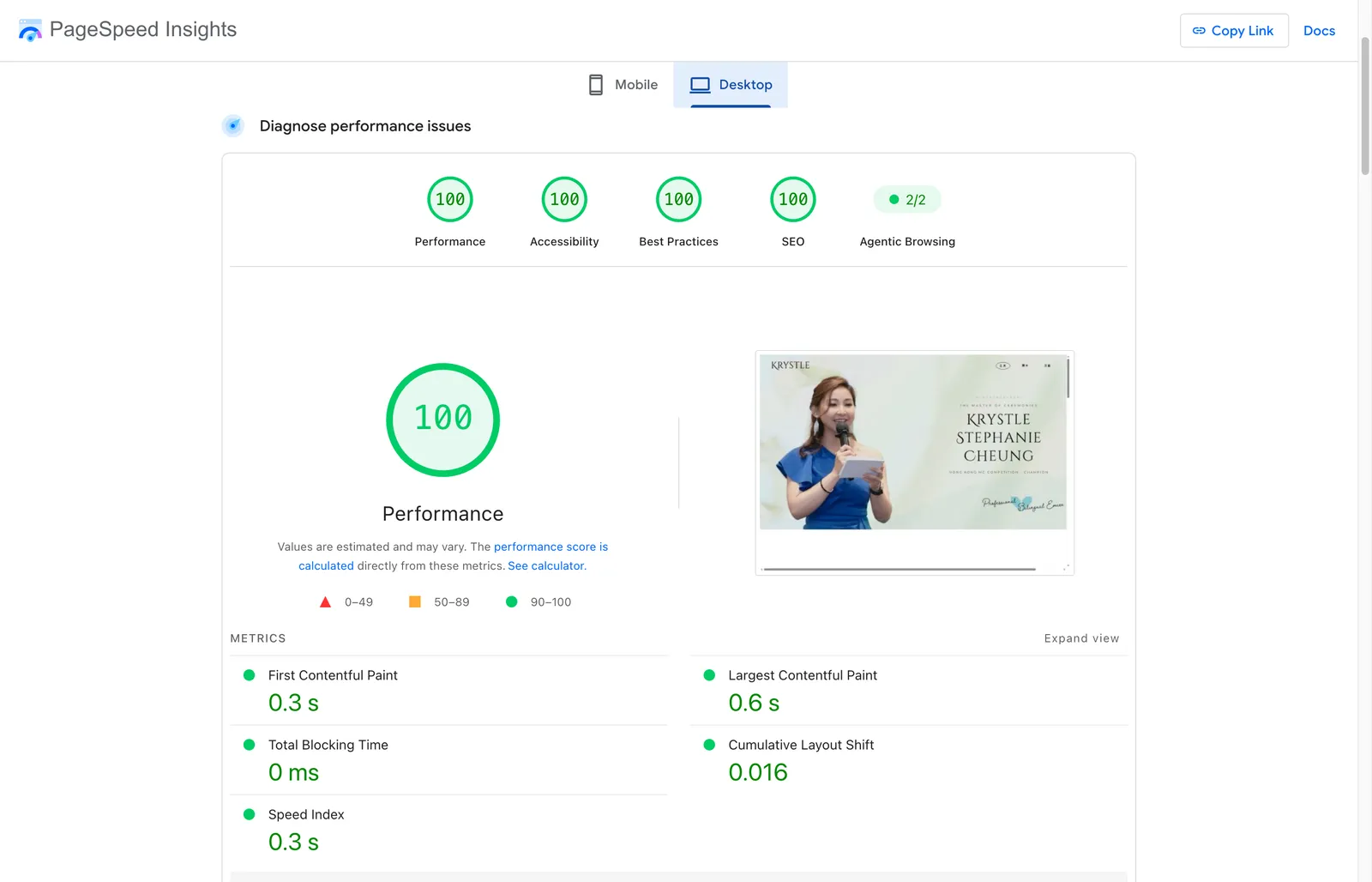
Desktop: a straight 100 across the board — first paint 0.3 s, LCP 0.6 s. And the phantom 6.5-second LCP? Live mobile LCP is 2.9–3.7 s, desktop 0.6 s. The artifact stayed in the lab.
The honest pros and cons
This is the part most “we left WordPress” posts skip. The trade is real, in both directions.
What we gained:
- Speed that’s structural, not tuned. Pre-rendered HTML on a CDN doesn’t need caching plugins, because there’s nothing to cache around. 0.3 s first paint isn’t an optimization; it’s the default.
- A whole class of failures gone. No PHP, no database, no plugin updates, no admin login to attack, no nonce-vs-cache races. The Part II bug — content silently vanishing behind a failing API — is structurally impossible now.
- Near-zero running cost and maintenance. A folder of files on Cloudflare’s free tier. Nothing to patch on a Tuesday night.
- Content became data. The 85 events live in JSON; bulk changes — recategorise a batch, swap a season of photos, add ten events after a busy quarter — are a search-and-replace or a five-line script plus one build command. In Elementor, that was 85 pages of clicking, which is why those edits kept not happening. For a growing business this matters more than the speed.
- Ownership. Plain files in git: diffable, portable to any host, and — not a small thing in 2026 — trivially legible to an AI agent.
What we gave up:
- The CMS. Krystle can’t log in and edit a page herself anymore. Every change goes through the data files and a build. That’s fine here — her in-house developer shares a bed with her — but it’s the honest headline cost.
- The plugin ecosystem. Need a form? That’s an external service now. A shop? Don’t — use a real commerce platform. The old site “had” those powers (and paid for them on every page load while using none of them), but a site that genuinely needs them shouldn’t do this.
- A build step exists. Someone must own ~400 lines of build script. Less surface than 20 plugins, but it’s not zero, and it’s not clickable.
- Design changes are code changes. No drag-and-drop. A restyle means editing CSS.
Static-from-data fits a site whose content is structured and changes in batches — portfolios, brochures, menus, event lists. It’s the wrong answer for a non-technical owner who writes daily, or a site that lives off plugins. The question isn’t “is WordPress bad?” — it’s who edits this site, how often, and in what shape?
What this actually demonstrates
This is the same story I keep telling clients about AI adoption, just closer to home. The agent did the parts that never get done because they’re tedious: crawling every page, generating 805 image variants, stamping 102 pages, checking 815 links. I did the parts that need taste and judgment: what to keep, what to cut, when “the score is lying” — and the final say on my wife’s public face.
Neither of us could have shipped this in a weekend alone. That’s the whole point.
This series: Part I — you’re here · Part II — the UI: same design, an interface that works · Part III — the SEO story · Part IV — the site was live, then came the lessons.
Got a site that’s slower than it should be? I’m happy to take a look — email me.