 Nam
Nam

Last month I took one of our Google Cloud projects from ~$2,800/month to ~$300/month. That’s about $30,000 a year, and I did it in an afternoon — sitting next to Claude, driving the gcloud CLI.
No code changed. No downtime. Nothing was re-architected.
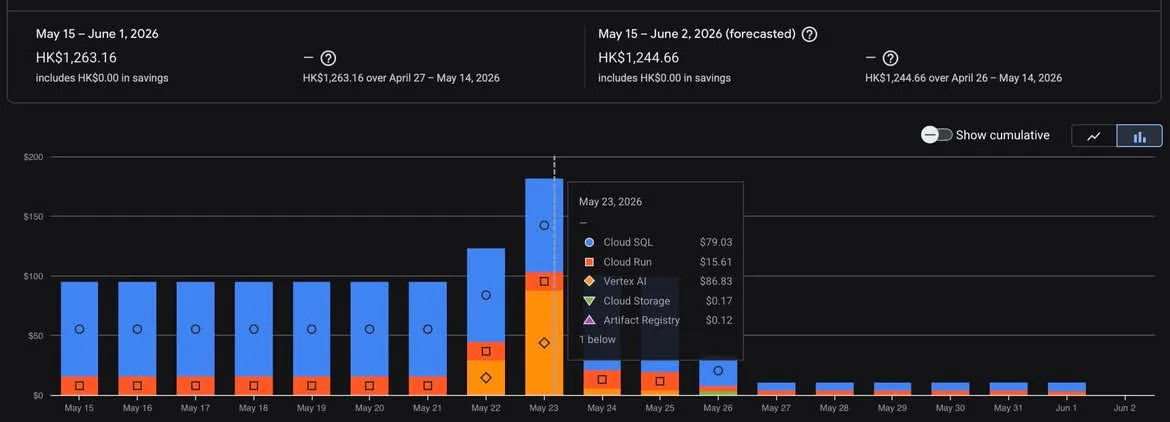
What it looks like in the billing console: daily spend dropping off a cliff once the over-provisioned resources — Cloud SQL, an idle service or two, the usual suspects — were right-sized.
Table of contents
Open Table of contents
The waste was never the architecture
Here’s the thing that surprised me: none of the savings came from fixing a “bad” system. The architecture was fine. The waste came almost entirely from assumptions that were reasonable on day one and never got revisited — a database sized for a launch spike that never came back, a staging box running 24/7 “for now”, log retention left at the default, dev traffic nobody was watching.
That’s the real shape of most cloud bills. Not a design flaw you can point at. A hundred small settings that were correct once and quietly stopped being correct.
The problem is that auditing all of it is tedious — exactly the kind of slow, careful, read-everything work that’s easy to keep postponing. Which is why it never gets done.
That’s the part AI changes.
The agentic workflow
The setup is simple: Claude does the reasoning, gcloud does the reach, and I hold the gate. It runs as a loop, not a single magic command.
I keep it to four phases, and the order is the whole point.
1. Read-only audit
Give the agent read access and only read access. Let it run describe and list across the project, pull utilization from Cloud Monitoring, and read the billing breakdown. It builds an inventory of what exists, what it costs, and what’s actually being used.
# The kind of thing the agent runs in this phase — all read-only
gcloud sql instances describe prod-db --format="yaml(settings.tier,settings.dataDiskSizeGb,settings.availabilityType)"
gcloud compute instances list --format="table(name,machineType.basename(),status)"
gcloud compute addresses list --filter="status=RESERVED"
gcloud recommender recommendations list \
  --recommender=google.compute.instance.MachineTypeRecommender \
--location=us-central1-a --format="table(description,primaryImpact.costProjection.cost.units)"Use a least-privilege, read-only service account for this phase. The agent cannot break what it cannot write to. Everything interesting happens before you ever grant write access.
2. Propose and price
Now Claude turns the inventory into a ranked list of changes: what to cut, the estimated monthly saving, and — crucially — a risk level for each. Reversible right-sizing at the top; anything with a delete or a prod restart at the bottom.
This is where you read carefully and cross things off. The agent proposes; you decide what’s even a candidate.
3. Execute one change at a time, behind a gate
Only now does write access come out, and only for the specific change in hand. For each item: apply it on staging or non-prod first, verify the service still works, then prod — with me approving anything destructive or prod-facing.
Never let an agent run delete or a production patch unattended. Batching “just these ten changes” is how you turn a $30k win into an outage. One change, verify, next.
4. Verify and keep a way back
After each change, confirm the thing still works (no downtime is a check, not a hope) and that next cycle’s billing actually trends down. Snapshot before anything touches a disk or a database.
The cuts that added up
Same playbook, applied item by item. The database was the big one; the rest are the boring wins that quietly stack up.
Right-size the managed database (Cloud SQL / RDS)
This was the single largest line. The instance had been provisioned for a load profile that no longer existed — CPU and memory sat mostly idle, but we paid for the peak every hour of every day.
# After confirming low utilization in Monitoring, and taking a backup first:
gcloud sql backups create --instance=staging-db          # safety net
gcloud sql instances patch staging-db --cpu=2 --memory=7680MB # scale down (custom size), test here firstA Cloud SQL machine-type change triggers a brief restart. Prove it on staging, then schedule prod for a low-traffic window. On non-prod, dropping HA (--availability-type=zonal) is often free money too.
Scale down and schedule staging
Staging doesn’t need to run at 3am on a Sunday. Right-size the machine type, and put it on a schedule so it’s only up during working hours — that alone is roughly a two-thirds cut on those instances.
gcloud compute resource-policies create instance-schedule work-hours-only \
  --region=us-central1 --timezone="Europe/London" \
  --vm-start-schedule="0 8 * * 1-5" --vm-stop-schedule="0 20 * * 1-5"
gcloud compute instances add-resource-policies staging-web \
  --zone=us-central1-a --resource-policies=work-hours-only
Trim log retention
Log buckets left at a long default retention quietly bill for storage you’ll never read. Drop non-prod retention to something sane, and add exclusion filters for the noisiest, least-useful log lines.
gcloud logging buckets update _Default --location=global --retention-days=30Retention is the one place to slow down: check nothing here is load-bearing for compliance or audit before you shorten it.
Cut dev bandwidth and idle resources
Dev and CI are where egress leaks: chatty cross-region traffic, data pulled that could be cached, and — the classic — reserved static IPs sitting unattached, which bill precisely because they’re idle. Same for orphaned disks and old snapshots.
gcloud compute addresses list --filter="status=RESERVED"    # idle = still charged
gcloud compute disks list --filter="-users:*"               # unattached disks
Kill overprovisioning and legacy defaults
The long tail: oversized boot disks, an idle load balancer, a GKE node pool provisioned for a demo, “temporary” settings from two years ago. Individually small; collectively a big slice of the bill.
The safety rules, in one place
If you take nothing else from this, take these:
- Read-only first. Do the entire audit before write access exists.
- Least privilege. Grant write narrowly, for the one change in hand, then revoke.
- Human gate on anything destructive or prod-facing. The agent proposes; a person approves deletes and production changes.
- Staging before prod. One change at a time. Verify between.
- Back up before disks and databases. Snapshots are cheap; regret isn’t.
- Prefer reversible over irreversible. Scale down before you delete. Delete only when you’re certain, and last.
- Watch billing and monitoring after. The win isn’t real until next cycle’s bill confirms it and nothing broke.
The real takeaway
The tool matters less than the habit. Claude and gcloud didn’t find anything a patient engineer couldn’t have — they just made the patient, boring part fast enough that it actually got done. That’s most of what “AI adoption” looks like in practice: not magic, just finally doing the careful work you kept putting off.
The bill was never the problem. The un-revisited assumptions were. Now they get revisited on a Tuesday afternoon, safely — and that’s the part worth keeping.
Got a cloud bill that’s crept up on you? I’m happy to compare notes — email me.